
Use color to help players recognize what is happening and decide what to do next. Pair each important state with explicit text and a distinct shape, then choose background and foreground colors that keep those signals readable.
Using color psychology in game interface design works best when associations support the game’s own visual language. A green accent can become a familiar readiness cue through consistent use. Its meaning still depends on context, audience, and nearby signals. Assign colors to specific messages and actions before trying to make them convey an emotion.
Consider a Signal Relay interface with three states. Ready confirms that the player can continue. Installing explains why they are waiting and shows progress. Interrupted identifies a problem and offers recovery. The storyboard below gives both themes identical positions, dimensions, wording, icons, and progress values.
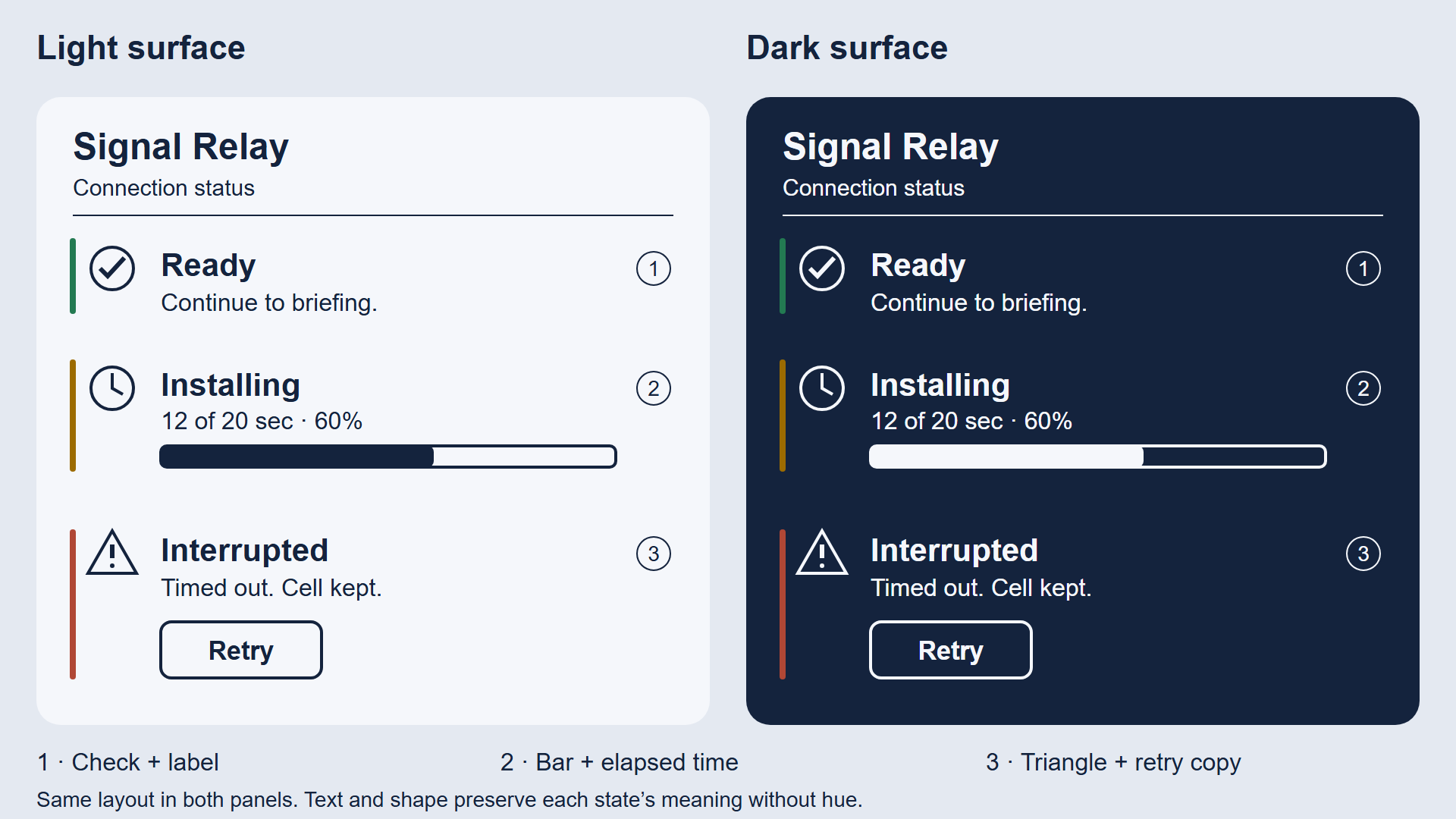
The message hierarchy follows the player’s needs. Ready provides quiet confirmation. Installing makes waiting understandable through a measurable bar and time label. Interrupted pairs a confirmed timeout with Retry. The cell remains available and the player is still in range. If they move out of range, the useful instruction changes to “Move closer to retry.” Reserve stronger emphasis for that recovery path instead of giving every status equal visual weight.
Use elapsed time and percentages only when the system can report meaningful progress. If duration is unknown, show an indeterminate indicator and honest wording such as “Installing the cell.” Keep a recognizable label beside any animation.
Begin contrast checks with fixed, solid surfaces. This isolates the foreground and background relationship before transparency, scenery, or effects complicate it. Contrast is a luminance ratio, so a vivid accent can still be difficult to distinguish from its surroundings.
| Variant | Text | Surface | Contrast |
|---|---|---|---|
| Light | #14233D |
#F5F7FB |
About 14.6:1 |
| Dark | #F5F7FB |
#14233D |
About 14.6:1 |
| Weak comparator | #767676 |
#808080 |
About 1.15:1 |
Reversing the chosen foreground and background preserves the calculated ratio. It does not prove that the themes feel equally comfortable or perform equally well during play. The weak gray pair shows how little separation two nearby luminance values provide.
For this project, set targets of at least 4.5:1 for text and 3:1 for essential icon and control boundaries against adjacent colors. Record these as design acceptance targets. This particular mockup does not establish accessibility conformance.
The structural read-through at 960 × 540 CSS pixels preserves the state distinctions when hue is removed: the check and Ready label remain, the progress bar retains its length and time label, and the warning triangle accompanies Interrupted and Retry. This checks the design and captions. It is not a human vision test.
The available comparison covers solid-color calculations and that structural check. Gameplay frames in shadow, glare, and motion still need separate evaluation. Check the actual HUD over changing scenes, including effects that pass behind text. A solid panel fill provides a predictable text surface. A translucent fill requires checking the resulting composite against each relevant background.
Xbox Accessibility Guideline 102 supports evaluating HUD foregrounds and backgrounds under changing conditions and offering contrast configuration. Guideline 103 supports alternatives to color for critical information. Sound or haptics can supplement a state change while its visible label and shape remain available.
Before approving the palette, make one short review:
- Choose the background fill that keeps text and essential shapes above the project’s contrast targets across relevant game frames.
- Remove hue and identify Ready, Installing, and Interrupted from their labels and shapes.
- Confirm that emphasis matches the next action: continue, wait, or retry.
Use the game UI foundations to decide which cues matter first. An accessibility review can check how those cues work across inputs and viewing conditions.