
Game HUD design starts with the decisions players must make while the scene remains readable. Give an imminent threat an unmistakable signal, keep routine goals easy to glance at, and let players request detailed information when they can inspect it safely. Every element should earn its position through the action it supports.
A HUD presents information during play. A temporary overlay adds a layer for a warning, interaction, or inspection. A fullscreen inventory occupies most of the display for item management. Neither an overlay nor an inventory screen inherently pauses the game. Make that behavior explicit.
Set priorities around player decisions
Consider the fictional Signal Relay encounter. The player approaches a relay, installs a charged cell, and avoids a patrol entering through a doorway. Installation requires attention, but a nearby patrol demands an immediate response.
Urgency and frequency diverge here. Install progress changes continuously. The patrol warning appears rarely, yet outranks that progress when detection is imminent. Decide priority by the consequence of missing information and the time available to act.
| Element and priority | Player action and reading frequency | Position and reason | Allowed coverage and clearing rule |
|---|---|---|---|
| Near patrol warning Immediate |
Stop installing and seek cover. Read immediately when the patrol approaches. | Peripheral left edge, with a triangle and “PATROL NEAR” label. Keep the doorway visible. | May cover a small background area outside the corridor. Clear when the nearby threat ends. |
| Objective Glance |
Choose the next task. Check on arrival, after a disruption, or after completion. | Top rail, providing a stable place to recover the current goal. | May occupy the reserved upper strip. Replace the instruction when the objective changes. |
| Install progress Contextual |
Continue, interrupt, or resume installation. Check during interaction and at state changes. | Lower-right, away from the central doorway and its approach. | May cover nearby floor detail. Hide on leaving interaction. Show explicit interrupted, failed, or successful results before clearing. |
| Map On request |
Inspect routes during a safe moment. Open when navigation requires detail. | Compact edge control opens an inspection overlay. | The expanded view may cover the scene while inspected. Close on dismissal and restore the previous view. |
| Inventory On request |
Inspect equipment, compare items, or change a loadout during a safe moment. | Dedicated fullscreen view gives item relationships sufficient space. | May replace the playfield while open. Close on dismissal and retain item focus for the next visit. |
Reserve the corridor before placing panels
This original 960 × 540 schematic reserves the center corridor for movement, the doorway, and patrol entry. The dashed rectangle marks a rejected expanded map placement. Its footprint demonstrates the obstruction even though the map itself is omitted.
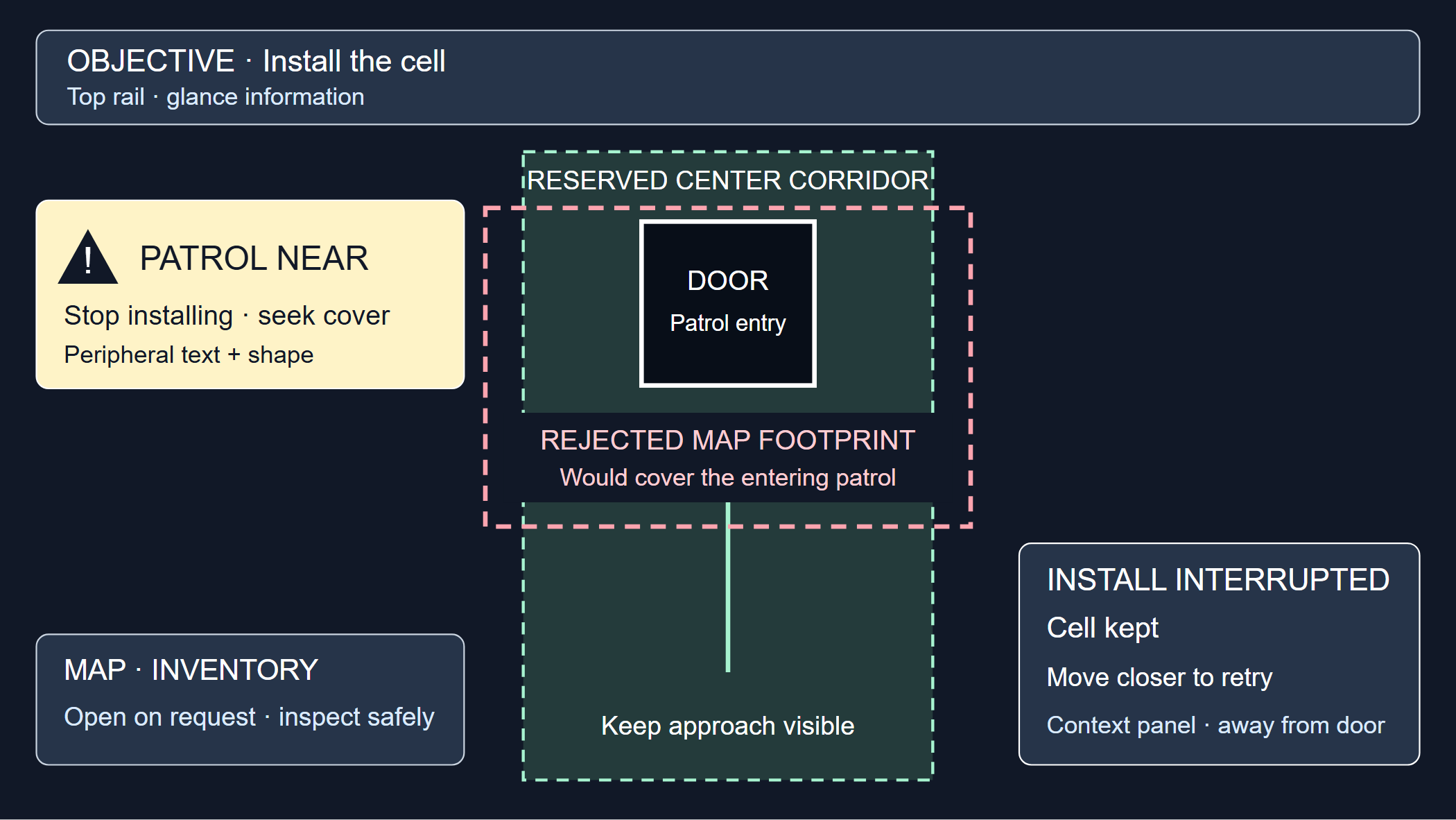
Calm approach: the player can glance at the objective while viewing the route. Map detail stays closed behind its compact edge control.
Patrol entry: the bad version’s centered expanded map would cover the doorway precisely when the patrol enters. The revised option keeps the map closed and presents an edge warning with text and shape.
Interrupted install: the relay cancels the pending installation and keeps the charged cell in inventory. “Move closer to retry” shows the next action. On success, “Relay powered” confirms acceptance before the panel clears.
Follow the mechanic to the next design problem
- Diegetic comparison: compare a relay-mounted progress display with the screen-space panel. World placement can connect feedback to equipment, but distance, angle, and occlusion affect readability.
- Racing layout: reserve the road and upcoming turn. Position speed and gear for repeated glances, while urgent collision warnings receive stronger prominence.
- Survival conditions: distinguish a slow resource decline from a threshold requiring action. Check whether darkness, weather, or combat obscures either signal.
- Inventory patterns: provide clear item focus, comparison, equip feedback, and a predictable exit. State whether opening inventory pauses play. If time continues, players need a safe opportunity to inspect it.
Check signals against changing scenes
Review the HUD over bright doorways, dark rooms, movement, and effects. Xbox Accessibility Guideline 102 calls for evaluating foreground and background contrast across changing conditions and supporting contrast configuration. A static contrast calculation does not establish usability during play.
Pair warning color with a recognizable shape and explicit label. Consider additional sensory cues where appropriate, following Xbox Accessibility Guideline 103. These guidelines inform the design, but do not validate this fictional encounter’s performance.
When planning a usability test, give players a short task that shows whether they notice patrol entry, understand interruption, and recover their objective. The schematic establishes placement logic. Those player outcomes remain untested.